Most electricians invest in a smart-looking website, then wonder why the phone isn't ringing. The truth is, the words on your service pages do far more heavy lifting than the design ever will. They're what Google reads, and they're what convinces a homeowner with a tripped fuse box to pick up the phone.
In this guide, you'll find a practical walkthrough of every section your electrician website content needs, from the opening line to the final call to action. No marketing jargon, no fluff, just the building blocks that turn visitors into quote requests.
Whether you're rewriting an old site or starting fresh, you'll come away knowing exactly what to write, where to put it, and why each piece matters for local SEO and conversion.
Why Your Electrician Website Content Matters More Than Your Design
A clean design might impress your mates, but it won't rank you on Google or convince a worried homeowner you're the right person to call. Every service page you publish has to do two jobs at once: satisfy Google's algorithm so you show up in local searches, and reassure a stressed customer who just lost power in their kitchen.
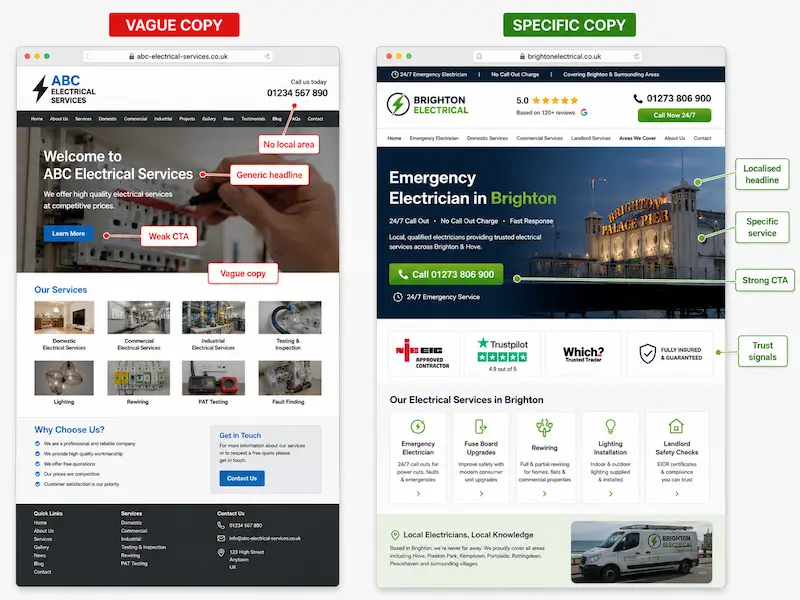
The brochure-style site, the one that says "We provide quality electrical services across Essex", does neither. It's vague, it's forgettable, and it gives Google nothing specific to rank. A lead-generating site does the opposite. It speaks plainly, names real problems, and shows real credibility.
Compare these two openings:
-
Vague: "We do electrical work across Essex."
-
Specific: "Emergency fuse box repairs in Billericay, available 24/7, NICEIC-registered."
The second version tells Google what you do, where you do it, and why you can be trusted, all in one line. It also answers the exact question the customer typed into their phone. That's the difference good content makes.
The Core Structure of a High-Performing Electrician Service Page
Before we get into the writing, it helps to see the page as a whole. A good service page follows the same flow a worried customer scans in their head: what is this, can you help me, can I trust you, what do other people say, how do I get hold of you?
Here's the recommended anatomy, in order:
-
H1 with the service and location
-
Short intro confirming you can help
-
The problems you solve
-
The specific services covered
-
Areas you serve
-
Trust signals (accreditations, insurance, photos)
-
Customer reviews
-
FAQs
-
Clear call to action
Each block builds on the last. Skip one and the page feels incomplete, even if the customer can't quite say why.
One Service, One Page: Why Separate Pages Beat a Single 'Services' Page
The most common mistake we see on small electrician sites is one giant "Services" page listing everything from rewires to PAT testing. It feels efficient. It's also why those sites don't rank.
Google ranks specific pages for specific queries. Someone searching "EICR Chelmsford" wants a page about EICRs in Chelmsford, not a paragraph buried halfway down a generic services list. If you want to rank for both "Electrician in Chelmsford" and "EICR Chelmsford", those need to be two different URLs.
A typical small-site sitemap should look something like this:
-
Home
-
Services (hub page)
-
Rewires
-
EICR Testing
-
Fuse Box Upgrades
-
EV Charger Installation
-
Emergency Call-Outs
Yes, it's more work upfront. But each page becomes a dedicated salesperson for one specific service, working around the clock to bring in the right kind of enquiry. We've covered this in more detail in our guide to the service pages every electrician website needs.
Writing a Clear Service Description (Without Sounding Like Every Other Electrician)
The first two or three sentences of every service page have to do three things: confirm the service, confirm the location, and hint at credibility. Get those right and you've already beaten 80% of your competition.
Keep the language plain. Your customer isn't an electrician. Words like "consumer unit" are fine, but "type B RCBO" probably isn't. Drop the trade jargon and write like you'd explain it to a neighbour.
Here's the difference:
-
Generic: "We provide quality electrical services to domestic and commercial clients."
-
Specific: "Need a full house rewire in Romford? We're NICEIC-registered electricians with 15 years' experience working on Victorian and post-war homes across East London and Essex."
The second version slips in the primary keyword naturally, names the location, and signals experience and accreditation in one sentence. No salesy fluff. Just the facts the customer wants to know.
Aim for three to four short sentences in your intro. Long enough to set the scene, short enough that nobody bounces.
Talking About the Problems You Solve (Not Just the Services You Offer)
Here's a question worth asking: when was the last time someone Googled "electrical installation"? Almost never. They Google things like "lights keep tripping" or "no power in kitchen" or "burning smell from fuse box".
That's why framing your page around problems, not services, is so powerful. It mirrors how real people search, captures long-tail keywords, and immediately tells the reader you understand their situation.
For a Fuse Box Upgrade page, your "Problems We Solve" list might look like this:
-
Fuse keeps tripping when the kettle or toaster is on
-
Old wired fuse box needs upgrading to a modern consumer unit
-
Landlord needs an EICR before re-letting the property
-
Buzzing or burning smell coming from the fuse box
Each line is a real query someone types into Google when they're worried. By naming the problem on your page, you become the answer.
Some electricians worry this sounds negative. It doesn't. It sounds like you've seen it all before, which is exactly what a panicked homeowner wants to hear.
Listing the Specific Services You Cover on the Page
Once you've named the problems, spell out what you actually do about them. A short bulleted list of sub-tasks adds depth, gives Google more to chew on, and makes the page easy to scan.
For an EV charger installation page, your "What's Included" might be:
-
Pre-installation site survey and load assessment
-
OZEV grant guidance and paperwork support
-
Tethered or untethered unit options
-
Smart charger setup and app configuration
-
Type 2 socket installation to BS 7671 standards
-
Full testing, certification, and notification to your DNO
-
3-year warranty on parts and workmanship
Seven specifics, each one useful. Don't go overboard. Twenty bullet points starts to look like padding. Five to eight is the sweet spot.
On pricing: a starting-from figure ("EV charger installs from £799") sets expectations and filters out tyre-kickers, but full price lists can box you in. Use your judgement.
Areas Covered: The Local SEO Goldmine Most Electricians Get Wrong
This is one of the highest-impact sections on the whole page, and the one most electricians fumble. The temptation is to dump a list of 50 nearby towns at the bottom in tiny text, hoping Google will rank you for all of them. It won't. It'll probably do the opposite.
The right approach is to mention your areas naturally, in proper sentences, in the body copy. Something like:
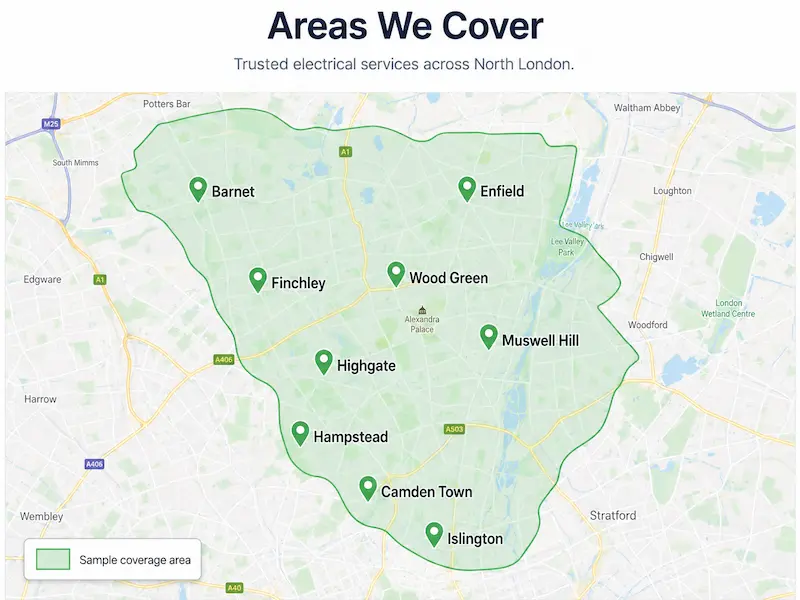
"We work across South Essex, with most jobs in Basildon, Billericay, Wickford, and Brentwood. For larger commercial contracts we cover the M25 corridor down into East London."
That short paragraph names real towns, gives geographic context, and reads like a human wrote it. Compare that to a wall of 60 postcodes and you can see why Google treats the two very differently.
A good rule of thumb: name your core service area in the first 100 words, then expand on it in a dedicated section further down.
When to Create Dedicated Location Pages
The natural next question: should I build a separate page for every town I serve? Sometimes yes, sometimes no.
Build a location page when you have genuine demand from that town and you can write something genuinely useful about it. Skip it if you've only worked there once and you'd just be swapping the town name into a copy-paste template. Google calls those "thin pages" and ranks them poorly.
A good "Electrician in Wickford" page should include:
-
Real jobs you've done locally (with photos, if possible)
-
Area-specific notes (older housing stock, common consumer unit types, conservation areas)
-
Nearby landmarks or postcodes you regularly work around
-
Reviews from Wickford customers
-
A short FAQ tailored to that area
If you can't write 400 to 600 words of genuinely unique content per town, don't build the page. One strong page beats five weak ones every time.
Trust Signals That Turn Visitors Into Phone Calls
UK electrical work is heavily regulated, and customers know it. They actively look for proof you're qualified before they pick up the phone. Make that proof impossible to miss.
Near the top of every service page, include a short "trust strip" with your key credentials:
Fully insured · NICEIC-registered · Part P certified · 12-month workmanship guarantee
Add the actual logos if you have them, NICEIC, NAPIT, ELECSA, TrustMark. Don't bury them in the footer. Customers want to see them above the fold, on every page.
Other trust signals to weave in:
-
Years in business ("Serving Essex homeowners since 2009")
-
Insurance details (public liability cover amount)
-
Team and van photos in branded uniform
-
A real owner's name and face, not a stock image
A quick note: at Nestweb, we build SEO-optimised websites for UK small businesses from £700, and the single biggest conversion lift we see comes from moving trust signals from the footer to the top of the page. It's a five-minute change that pays back for years.
Photos and Visual Proof of Real Work
Stock photos of smiling electricians in pristine boiler rooms fool nobody. Real photos of your actual work do far more for both trust and image SEO.
Use your phone to capture:
-
Before and after shots of consumer unit upgrades
-
Completed EV charger installations
-
Team members on site in branded uniform
-
Inside-the-van shots showing tidy, professional kit
Phone photos are fine, as long as the lighting's reasonable and the shot is straight. You're not entering a competition.
When you upload them, name the files properly and write descriptive alt text. This is where most sites lose out on image search traffic.
-
Bad alt text: "IMG_2024.jpg"
-
Good alt text: "New Hager consumer unit installed in a 3-bed semi in Billericay"
The good version tells Google exactly what's in the image, helps you appear in image search, and supports the page's local relevance all at once.
Customer Reviews and Testimonials: How to Use Them on Service Pages
A "Reviews" page on its own is fine, but reviews work hardest when they sit on the specific service page they relate to. A glowing review about a rewire belongs on the rewire page, not buried in a list of unrelated comments.
Aim for two or three reviews per service page. Pull them from your Google Business Profile, Checkatrade, MyBuilder, or Trustpilot. Wherever you collected them, keep the format consistent:
★★★★★ "Tom rewired our whole house in five days, kept everything tidy, and explained what he was doing at every stage. Couldn't recommend him more." Sarah, Billericay, Full Rewire, March 2024
A star rating, the quote, a first name, a town, and the service type. That's all you need. Adding review schema markup (your developer or website builder can usually handle this) helps the stars show up in Google search results, which lifts click-through rates noticeably.
If you don't have many reviews yet, start collecting them properly. A simple text to every happy customer asking for a Google review is the single highest-ROI activity in your marketing. Our guide to optimising your Google Business Profile covers exactly how to do this.
FAQs: Answering Real Questions to Win Featured Snippets
A proper FAQ section on every service page punches above its weight. It catches long-tail searches, often wins featured snippets at the top of Google, and answers the questions customers were going to phone you to ask anyway.
Where do the questions come from? Three places:
-
Google's "People Also Ask" box (search your service and scroll down)
-
The emails and texts you actually get from customers
-
The questions you answer on the phone every week
Keep answers tight. Under 60 words is the sweet spot for snippet eligibility. Add FAQ schema markup so Google can read them properly.
Sample FAQs for an EICR page:
-
How long does an EICR take? For a typical 3-bed house, allow 2 to 4 hours. Larger properties or older wiring can take longer.
-
How much does an EICR cost in the UK? Most domestic EICRs sit between £150 and £300, depending on property size and number of circuits.
-
Is an EICR a legal requirement? Yes, for private rented properties in England since April 2020. Landlords must have a valid EICR every 5 years.
Four to six FAQs per service page is plenty. More than that and you're padding.
Writing Calls to Action That Actually Get Clicked
"Contact Us" is the weakest button on the internet. It tells the visitor nothing about what happens next, and it gives them no reason to click now rather than later.
Strong CTAs are specific. Compare:
-
Weak: "Submit"
-
Strong: "Get a free fuse box quote"
You also need more than one CTA per page. Place one near the top (for the visitor who's already decided), one in the middle (for the on-the-fence reader), and one at the bottom (for the thorough scroller).
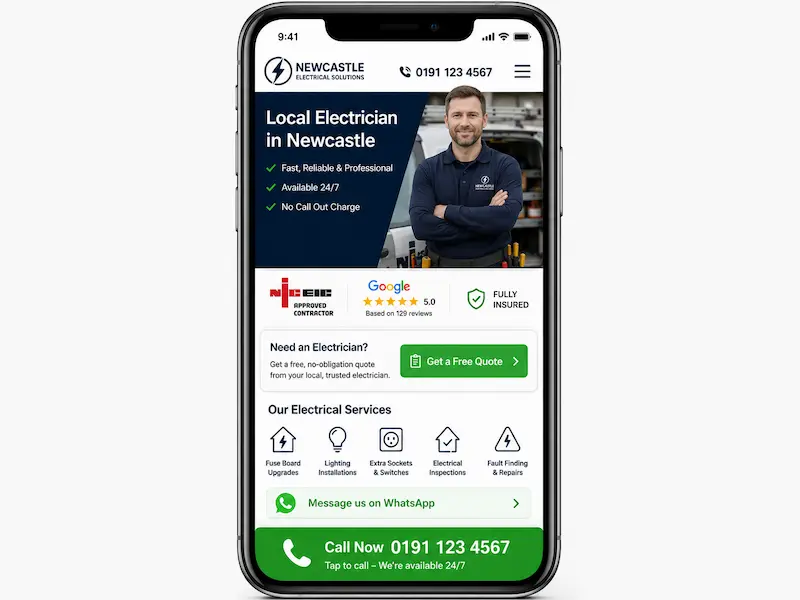
On mobile, where most of your traffic comes from, a tap-to-call sticky bar at the bottom of the screen is the single highest-converting element you can add. For emergency work especially, people want to talk to a human, fast.
Offer secondary options too:
-
A WhatsApp link with a prompt like "Not sure what you need? Send us a photo on WhatsApp"
-
A callback request form for after-hours enquiries
-
An online booking option for non-urgent jobs like EICRs
Different customers want different things. Give them choices.
Using Keywords Naturally Without Sounding Like a Robot
Let's clear up the keyword question once and for all. Yes, your main keyword needs to appear in a few specific places:
-
The H1 (page title)
-
The first paragraph
-
At least one H2
-
The meta title and meta description
-
The URL
Beyond that, stop counting. Google's modern algorithms reward natural language, related terms, and topical depth far more than raw repetition. Stuff your page with "electrician Billericay electrician Billericay electrician Billericay" and you'll rank worse, not better.
Use synonyms and related phrases naturally: "qualified electrician", "electrical contractor", "NICEIC-registered electrician", "local sparky". Mix in service-specific terms like "consumer unit", "rewire", "EICR", "EV charger". Google understands these are all part of the same topic.
Here's the difference in practice:
-
Stuffed: "Looking for an electrician Billericay? Our electrician Billericay team are the best electrician Billericay you'll find."
-
Natural: "Looking for an electrician in Billericay? We're a small, NICEIC-registered team covering homes and businesses across the area, from full rewires to emergency call-outs."
The natural version reads like a human wrote it. It also ranks better. Funny how that works. This is one of the most common electrician website mistakes we see when small business owners try to handle SEO themselves.
A Quick Checklist Before You Publish Any Service Page
Before you hit publish, run your page through this list. If you can tick every box, you're ahead of most of your competition.
-
Unique H1 that includes the service and location
-
Location named within the first 100 words
-
Plain-English intro confirming what you do and where
-
"Problems we solve" section with real customer language
-
Bulleted list of specific services included
-
Areas covered mentioned naturally in body copy
-
Trust strip with accreditations visible without scrolling
-
At least 2 customer reviews relevant to that service
-
4 to 6 FAQs with concise answers
-
Click-to-call CTA prominent on mobile
-
Original photos with descriptive alt text
-
Meta title and meta description written specifically for the page
-
Internal links to 2 or 3 related service pages
Take a screenshot of this list and keep it on your phone. Run every page through it before publishing.
Conclusion: Your Service Pages Are Your Hardest-Working Salespeople
Good service page content is a one-time investment that pays back every single month, in calls, in quotes, and in won jobs. Unlike paid ads, it doesn't stop working when you stop paying. Written properly, your pages keep selling for you at 3am on a Sunday.
Don't try to overhaul your whole site at once. Pick your single most profitable service, the one you most want more of, and rewrite that page first using the structure in this guide. Get it right, watch the enquiries come in, then move on to the next one.
If writing this yourself feels like too much on top of running the business, we get it. We're Nestweb, and we build professional SEO-optimised websites for UK small businesses from £700, including the full service page content, so you can focus on the actual electrical work. Take a look at how we helped BM Sparks grow their local enquiries if you'd like to see what that looks like in practice.
Whatever route you take, start with one page. Your future self, and your phone, will thank you.
Frequently Asked Questions
How long should an electrician's service page be? Aim for 600 to 1,200 words per service page. That's enough to cover the problem, the solution, your credentials, reviews, and FAQs without becoming a wall of text. Quality beats length every time.
Do I need a separate page for every service I offer? Yes, for your main services. One page per service (rewires, EICRs, fuse box upgrades, EV chargers) lets each page rank for its own keywords. A single "Services" page tries to rank for everything and ends up ranking for nothing.
How do I show up on Google for towns near me without spamming locations? Mention 4 to 6 core towns naturally in body copy. Build dedicated location pages only for areas where you have genuine demand and can write unique content. Keep your Name, Address, and Phone number consistent across every page and your Google Business Profile.
Can I write my electrician website content myself, or should I hire a copywriter? You absolutely can write it yourself. Nobody knows your work better than you do. The structure in this guide gives you a working template. If time is the issue more than knowledge, that's when getting help makes sense.
What's the most important section on an electrician service page? The opening 100 words and the call to action. The opening confirms you can help with their specific problem in their specific town. The CTA tells them exactly what to do next. Get those two right and the rest supports them.
How often should I update the content on my service pages? At least once a year for a refresh, plus immediate updates whenever regulations change (BS 7671 amendments, EICR rules, OZEV grant changes). Adding new reviews and recent project photos every few months keeps the page feeling current to both Google and customers.