If you're a UK electrician relying on word of mouth and the odd Checkatrade lead, you're leaving money on the table. Your Google Business Profile is the single most powerful free tool you've got and most electrical tradesmen either ignore it or set it up wrong.
This guide walks you through everything, step by step: setting it up properly, picking the right categories, getting reviews, and avoiding the mistakes that get profiles buried (or suspended).
By the end, you'll know exactly what to do tonight to start ranking higher for "electrician near me" without paying for ads, without hiring an agency, and without learning a single bit of marketing jargon.
Why Your Google Business Profile Is the Most Valuable Tool You're Probably Ignoring
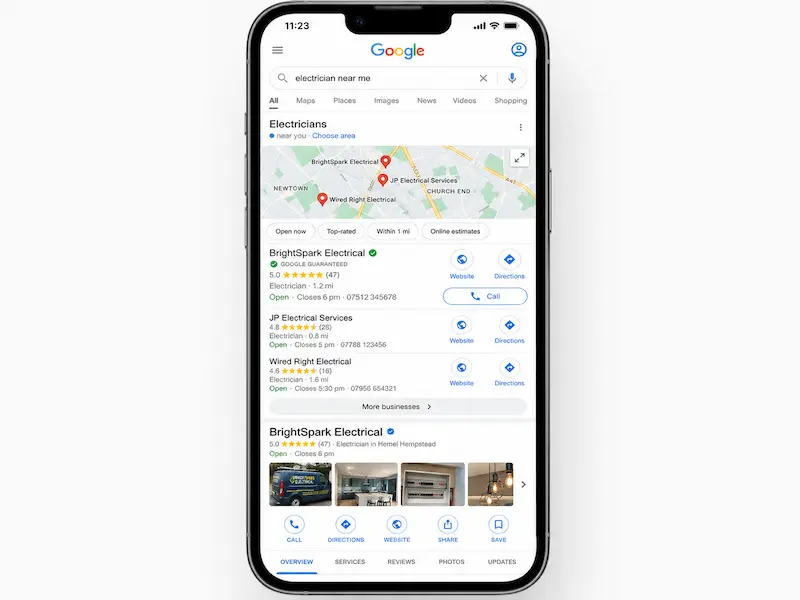
Your Google Business Profile (GBP) is the box that pops up on Google Maps and on the right-hand side of search results when someone Googles your business or, more importantly, when they Google "electrician Birmingham" or "EICR near me".
In 2026, this is the digital equivalent of having your name on the side of your van. Non-negotiable.
Most homeowners don't flick through Yellow Pages anymore. They don't even bother with Checkatrade as their first stop. They pull out their phone, type "electrician near me", and ring whoever's in the top three results the so-called Map Pack. Being in that Map Pack is often more valuable than being the #1 organic result on the page below it.
And here's the kicker: it's free. While platforms like MyBuilder, Rated People and Bark charge you per lead (often £15-£40 a pop, sometimes for jobs that never even materialise), Google Business Profile costs you nothing but a bit of time.
"Isn't this just for big businesses?" No sole traders dominate local results when they set things up right. "I've got a Facebook page, isn't that enough?" Facebook is fine for showing your existing customers what you're up to. It does very little for getting new ones. "I get most of my work from word of mouth." Brilliant, and your existing customers are now Googling you to check before they recommend you. Make sure they like what they see.
Setting Up Your Google Business Profile the Right Way
Head to google.com/business and either create a new profile or search for your business name. There's a fair chance Google or a directory has already auto-generated a listing for you. If so, claim it rather than creating a duplicate (duplicates are a fast track to suspension).
Verification in the UK currently happens by postcard, video call, or sometimes a phone code. Postcards take 5-14 days. Video verification is increasingly common and faster.
Service-Area Business vs. Storefront: Which One Are You?
Most electricians are Service-Area Businesses (SABs). You don't have customers turning up at your door, you go to them.
If that's you, set up as a SAB and hide your address. This is critical. A self-employed sparky working from a home office in Reading should hide the address but list service areas like RG1, RG2, Wokingham and Bracknell. An electrical contractor with an actual unit on a trading estate in Slough open to walk-ins should display the address as a storefront.
Hiding your home address won't hurt your rankings. Faking a commercial address (a virtual office, a mate's shop) absolutely will get you suspended. Don't do it.
Verifying Your Business (and What to Do If the Postcard Never Arrives)
If your postcard hasn't shown up after three weeks, you can request video verification through the GBP dashboard. You'll need to film, in one take: the outside of your premises (or your van with branding), your tools and materials, and proof of business (invoices on screen, your laptop signed into your business email).
It feels invasive, but it's safe. Google isn't keeping the footage long-term. It's just confirming you're real.
Choosing the Right Categories (This Is Where Most Electricians Lose Rankings)
Categories are arguably the single biggest ranking factor on GBP, and the area where most tradespeople get it wrong.
You get one primary category and up to nine secondary ones. For most sparkies, "Electrician" is the right primary. The mistake is either picking only that one (missing out on related searches) or picking ten irrelevant ones (confusing Google).
Be relevant, not greedy. Each secondary should reflect work you actually do.
Niche Categories That Open Up New Searches
This is where you can pick up high-value, low-competition jobs:
- EV charging station contractor — for anyone fitting Zappis, Pod Points, or Ohmes
- Solar panel installer — if you're MCS-registered
- Lighting contractor — for garden lighting, commercial fit-outs, smart lighting
- Security system installer — alarms, CCTV, smart doorbells
- Commercial electrician — for those doing shopfits and offices
A Manchester electrician who adds "EV charging station contractor" suddenly appears for "EV charger installer Manchester" , a search far less crowded than "electrician Manchester" and worth significantly more per job.
Writing a Business Description That Sounds Like You (Not a Marketing Robot)
You've got 750 characters. Use them well.
Include: years of experience, qualifications (NICEIC, NAPIT, Part P registered), areas you cover, and the types of work you specialise in. Avoid: keyword stuffing, salesy nonsense, and links (Google strips them anyway).
Bland version: "We are an electrical company that does electrical work for domestic and commercial customers across the area."
Better version: "Sheffield-based electrician with 12 years' experience, NICEIC-approved and Part P registered. We handle full rewires, consumer unit upgrades, EICRs for landlords, and EV charger installations across S1-S20 and surrounding postcodes. Family-run, fully insured, no job too small."
The second one is specific, human, and naturally includes the kind of phrases people actually search for.
Listing Your Services and Service Areas Properly
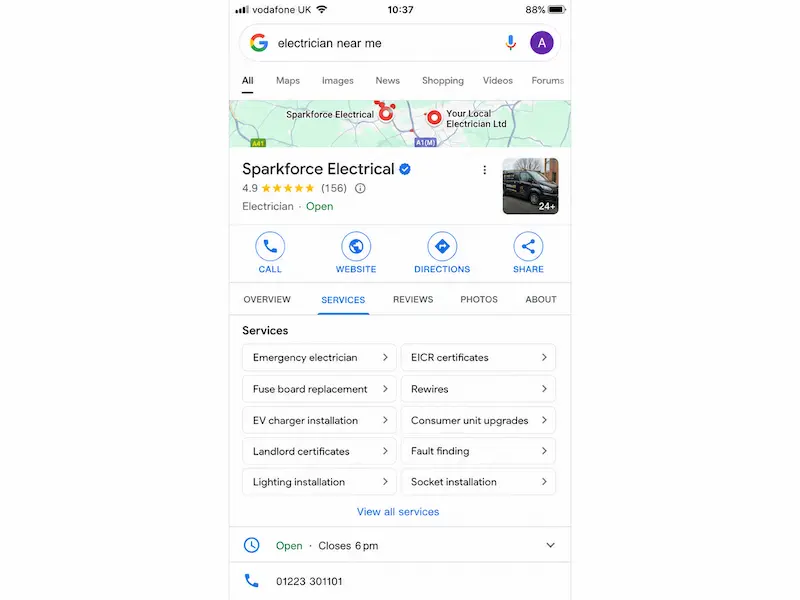
The "Services" section of GBP is criminally underused. Each service you list is another signal to Google about what you do and another chance to appear in relevant searches.
How to Pick the Right Service Areas (and Why "All of England" Is a Bad Idea)
Google rewards proximity and consistency. If you list 20 cities you don't actually work in, you'll confuse the algorithm and the customers who turn up expecting you on their doorstep within an hour.
A Bristol-based electrician should list Bristol, Bath, Weston-super-Mare, and the relevant BS and BA postcodes. Not Cardiff. Not Exeter. Even if you'd technically drive there for a big rewire, a Cardiff homeowner Googling "electrician near me" wants someone from Cardiff.
Stick to a realistic radius, usually a 30-45 minute drive and let proximity work in your favour.
Adding Specific Services That Customers Actually Search For
Vague services don't rank. Specific ones do.
Instead of "Electrical work", add:
- Fuse board replacement
- Consumer unit upgrade
- EICR testing (especially "Landlord EICR")
- EV charger installation
- Smoke and heat alarm installation
- Garden and outdoor lighting
- Emergency electrician callout
- House rewire
Each one is a separate search someone is making right now.
Photos and Videos: The Thing That Makes Customers Pick You Over Three Other Electricians
Profiles with regularly uploaded photos get significantly more clicks and calls than profiles without. Yet most electricians upload three blurry pictures from 2019 and call it done.
You don't need a professional photographer. A clean phone photo of a tidy new consumer unit beats a stock image every time. Customers can spot stock photos a mile off, and it kills your credibility instantly.
What to upload regularly:
- Your van (branded, parked on jobs)
- Finished installations neat consumer units, EV chargers, light fittings
- Before/after shots
- The team in branded polos
- Tools, materials, certificates
Aim for two to four new photos a month. A profile with 40 fresh, real photos will pull in significantly more enquiries than one with three grainy ones.

Getting Google Reviews (the Right Way) and Replying Like a Human
Reviews are a double whammy: they affect both your ranking and whether the customer actually picks up the phone after finding you.
A Simple System for Asking Customers for Reviews
Ask right after the job, while satisfaction is high. Don't wait three weeks until they've forgotten how chuffed they were.
Use a short text Google gives you a custom short link in your dashboard. Something like:
"Hi Sarah, glad we got the new fuse board sorted today. If you've got 30 seconds, a quick Google review really helps a small business like ours [link]. Cheers, Dave."
That's it. No hard sell. Most happy customers are glad to help.
How to Reply to Reviews (Including Bad Ones)
Reply to every review. Google tracks this and so do potential customers reading your profile.
For positive reviews, keep it short and personal:
"Thanks Sarah glad the new fuse board's keeping things ticking over. Give us a shout if you need anything else."
For negative reviews, don't get defensive. Acknowledge, explain briefly, and offer to take it offline:
"Hi Mark, sorry to hear you weren't happy with the visit. I'd genuinely like to understand what went wrong. Could you give me a call on 0117 xxx so we can sort it? Dave"
A calm reply to a 2-star review often impresses future customers more than ten 5-star ones.
Posts, Updates, and Q&A: The Bits Most Electricians Ignore (and Shouldn't)
Google Posts are mini updates that show on your profile. Use them for finished jobs, seasonal availability, and special offers.
You don't need to post every day. Once a week is enough:
"Just finished a full rewire in Tunbridge Wells, here's what was hiding behind the kitchen wall (it wasn't pretty)."
Or seasonal:
"Booking landlord EICRs for autumn a few slots left in October."
The Q&A section is also worth ten minutes of your time. You can ask and answer your own common questions "Do you do emergency callouts?", "What areas do you cover?", "Are you NICEIC registered?". This pre-empts what customers want to know and gives Google more relevant text to work with.
Local SEO Beyond Google Business Profile: Connecting It All Together
Your GBP doesn't sit in a vacuum. Google cross-checks your name, address, and phone number (NAP) across the web Yell, Thomson Local, Checkatrade, your website, your social pages. If they don't match, your rankings suffer.
Pick one version of your business details and use them everywhere, exactly the same.
Why a Decent Website Multiplies Your GBP Results
GBP gets you found. A website closes the deal.
Customers checking your profile will click through to your site and what they see in those next 5 seconds decides whether they call. A clean, fast-loading site with reviews, recent jobs, and a quote form will convert. A 2014 Wix page with broken images won't.
Local landing pages proper pages for "Electrician in Guildford", "EICR Testing Reading", "EV Charger Installation Bristol" feed Google extra relevance signals that boost your GBP itself. It's a flywheel.
A properly built website for electricians is the single biggest multiplier on the work you've already put into GBP.
Linking Your Website and Google Business Profile Properly
Add your website URL to GBP. Make sure the phone number on your site matches the one on your profile, exactly. Embed a Google Map on your contact page. If you (or your developer) can add Local Business schema markup to your site even better. It's a bit of code that tells Google explicitly who you are, where you work, and what you do.
If you're curious how websites and Google work together, this guide on getting your website on Google covers the basics.
Common Mistakes That Get Electricians' Profiles Suspended or Buried
Avoid these like a 1980s aluminium consumer unit:
- Keyword-stuffing the business name ("Dave's Electrical 24/7 Emergency Electrician Manchester"). Just use your real business name. Google will spot it and ban you.
- Creating duplicate listings for different "service areas". One business, one profile.
- Buying or asking for fake reviews. Google's filters are scarily good now.
- Using a virtual office or mailbox address as a fake storefront.
- Ignoring the profile for months. Activity matters. A dormant profile slides down the rankings.
A suspended profile can take 4-8 weeks to reinstate, during which you're invisible. Worth avoiding.
What to Do Each Month to Keep Your Profile Ranking
Fifteen minutes a month is genuinely all it takes. Stick this somewhere visible:
First Friday of the month:
- Upload 2-4 new photos (van, finished jobs, team)
- Publish 1 Google Post (recent job or seasonal note)
- Send review request texts to last week's happy customers
- Reply to any new reviews
- Check the Insights tab see what searches are finding you
That's it. No agency required. For more advanced tactics, our deeper guide on local SEO for electricians and other small businesses goes further.
Wrapping It Up: Your Next Move
Your Google Business Profile is the cheapest, most powerful lead generator you'll ever have but only if you actually use it. Categories chosen properly. Real photos. Genuine reviews. Replies to every comment. A monthly fifteen-minute habit.
Do one thing today: open your profile and add five photos. It'll take ten minutes and it'll move the needle by next week.
Once your GBP is pulling its weight, the next bottleneck is your website. If yours is dated or you don't have one that's where you start losing the customers GBP sends your way.
At Nestweb we build conversion-focused websites for UK electricians from £700 designed specifically to pair with Google Business Profile and turn map clicks into booked jobs.
FAQs: Google Business Profile for Electricians
How long does it take to rank on Google Maps as a new electrician? With a properly set-up profile, real reviews, and consistent activity, most electricians start appearing in the local Map Pack within 2-3 months. Highly competitive areas (central London, Manchester) can take longer.
Do I need a website if I have a Google Business Profile? Technically no, but you'll lose jobs to competitors who have one. GBP gets the click; a website gets the call. Without one, you're capping your conversion rate.
How do I get more Google reviews as an electrician without being annoying? Ask once, right after the job, by text, with a direct review link. Don't pester. Most happy customers will leave one if you make it easy. A 30-second ask gets far better results than a follow-up email three weeks later.
Can I rank in multiple towns with one Google Business Profile? Yes, within reason. List your real service areas (a 30-45 minute radius) and you'll appear in searches across them. To rank strongly in towns further afield, you typically need supporting local landing pages on your website.
Why has my electrician Google Business Profile dropped in the rankings? Common causes: a competitor recently optimised theirs, a Google algorithm update, NAP inconsistencies across the web, a drop in review activity, or category changes. Check Insights and audit your profile against this guide.
Is it worth paying someone to manage my Google Business Profile? For most sole traders and small firms no. The monthly maintenance is genuinely 15 minutes. Where it's worth paying is for the website that supports it, since that's where conversions are won or lost.