If you're an electrician in the UK wondering why your phone isn't ringing as much as it used to, the answer might be sitting in your customer's pocket right now. Most people looking for an electrician don't open a laptop. They grab their phone, type "electrician near me", and tap one of the first results that loads.
This article walks you through exactly why a mobile-friendly website for electricians is no longer optional, and what makes the difference between a site that wins the call and one that quietly sends business to your competitors.
You'll learn how customers actually behave, how to test your own site in under a minute, which features turn visitors into phone calls, and what realistic options you have to fix things, whether your budget is £0 or £5,000.
The Way Customers Actually Find Electricians in 2026
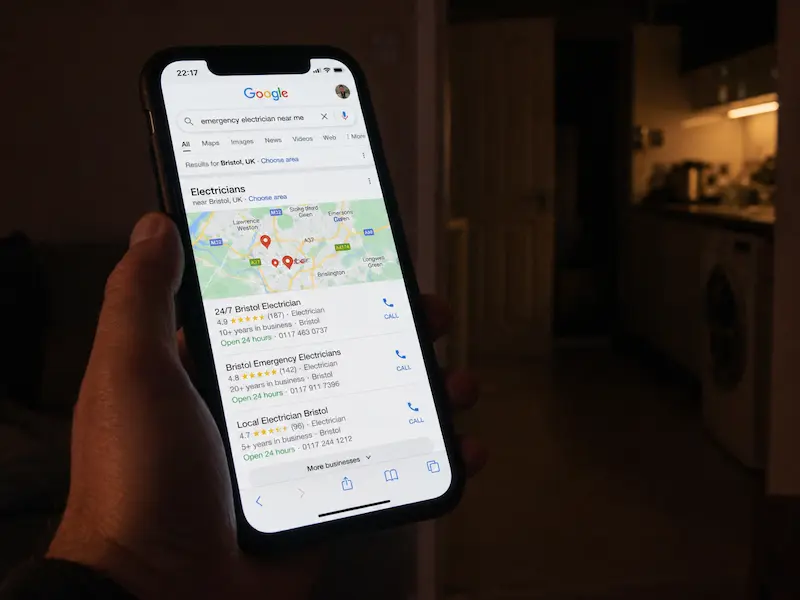
Picture a homeowner in Manchester. It's 7pm on a Tuesday. The fuse box trips, the lights go out, and the freezer full of last week's shopping starts to worry her. She doesn't dig out a phone book. She doesn't call her cousin's mate. She pulls out her phone and Googles "emergency electrician near me".
In the UK, over 75% of "near me" searches for local trades happen on mobile. That number climbs even higher in evenings and weekends, which is exactly when most electrical emergencies happen. Your customer is standing in a dark hallway with one hand on a torch and the other on a phone.
Here's what she does next, and it takes less than 90 seconds:
-
Taps one of the top 3 Google results
-
Waits 2 to 3 seconds for it to load
-
If it's slow or looks dodgy, she hits back and tries the next one
-
The first site that loads fast and shows a clear phone number gets the call
"But my customers come from word of mouth"
This is the most common objection, and it's half right. Referrals are gold. But here's the catch: people Google you even after a referral. Your neighbour says "call Dave, he's brilliant". The first thing your potential customer does is search "Dave Smith Electrician Bristol" to check you're real, see your reviews, and find your number.
If your site loads slowly or looks like it was built in 2014, the referral starts to feel risky. Trust evaporates in seconds.
What "Mobile-Friendly" Actually Means for an Electrician's Website
A lot of electricians assume mobile-friendly just means "my site shows up on a phone". It's much more than that.
A proper mobile-friendly site means:
-
Text is readable without pinching to zoom
-
Buttons are big enough to tap with a thumb
-
Pages load in under 3 seconds on 4G
-
No horizontal scrolling
-
Phone number is always visible and tappable
There's also a difference between "responsive" and "mobile-optimised". Responsive means the site adapts to fit any screen size. Mobile-optimised means it was built with phone users in mind from day one, with speed, simple navigation, and tap-to-call buttons at the heart of the design.
And here's the kicker: Google uses what's called mobile-first indexing. That means Google judges your entire website based on how it performs on a phone, not a desktop. If your mobile version is slow or messy, you drop in the rankings, full stop.
The 5-Second Test
Try this right now. Open your own website on your phone. Set a timer for 5 seconds. In that time, can you:
-
Read the headline without zooming in?
-
Tap your phone number with your thumb on the first try?
-
See clearly what services you offer?
-
Get the sense "yes, this is a real local business"?
If the answer to any of those is no, you've just experienced what your customers experience every day. Now do the same on two competitors' sites in your town. The difference will tell you everything.
Why Speed Matters More Than You Think (Especially on 4G)
Here's a hard truth most electricians never hear: 53% of mobile visitors leave a site if it takes longer than 3 seconds to load. Three seconds. That's less time than it takes to read this sentence.
Your customers aren't always on perfect WiFi. They're searching from a kitchen with patchy signal, from a van on a job, or from a rural cottage on shaky 4G. A slow website is like a van that won't start when the customer calls. It doesn't matter how good you are if you can't get there in time.
What makes a site slow? Usually one of these:
-
Huge unedited photos dragged straight from a phone camera
-
Free WordPress themes packed with features you don't use
-
Autoplay videos with background music
-
Bloated plugins that haven't been updated in years
Google now uses something called Core Web Vitals as a ranking factor. In plain English, that means Google measures how fast your main content appears (LCP), how quickly the site responds when tapped (INP), and whether things jump around as they load (CLS). Fail these, and you drop in search results.
How to Check Your Site's Speed (Free, in Under a Minute)
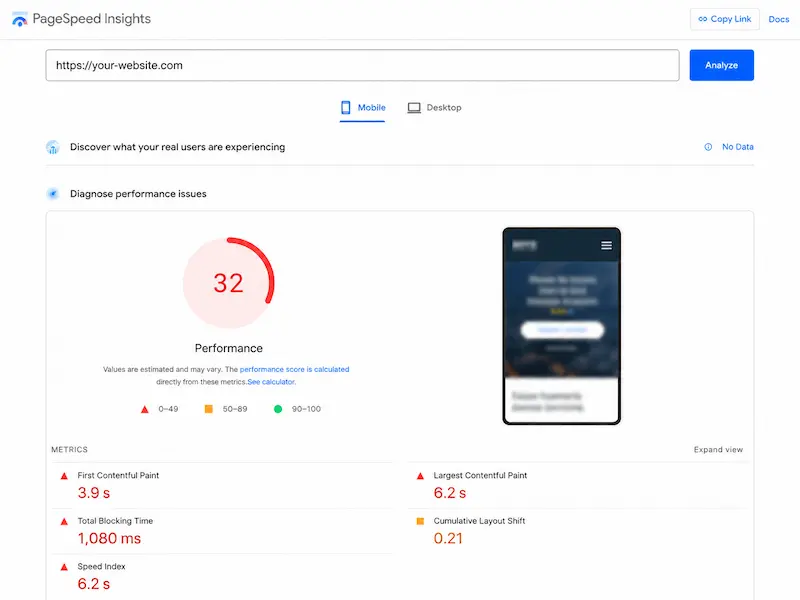
Go to Google PageSpeed Insights. Paste your website URL. Hit Analyze. Look at the mobile score, not the desktop one.
Here's what those numbers mean:
-
90 to 100: Excellent. Keep it that way.
-
50 to 89: Needs work. You're losing customers.
-
Under 50: Urgent. Every day this stays unfixed costs you money.
Most electrician websites we look at score somewhere between 25 and 45 on mobile. That's not unusual. It's just unprofitable.
The Hidden Cost of a Slow Site
Let's do the maths on a napkin. Say your site gets 200 visitors a month. If 53% bounce because the site's too slow, that's roughly 106 lost potential leads every month.
Even if only 1 in 10 of those would have called and 1 in 5 of those callers would have booked a job, you're looking at 2 lost jobs per month. At an average job value of £200, that's £400 a month, £4,800 a year, walking out the door.
For bigger jobs like rewires or EV charger installs, the numbers get painful quickly. A single missed rewire can be £3,000. That's a slow website costing you more than a new van.
The Mobile Features That Turn Visitors into Phone Calls
Speed gets people through the door. Conversion features get them to call you. Here are the ones that move the needle most for electricians.
A Sticky "Call Now" Button
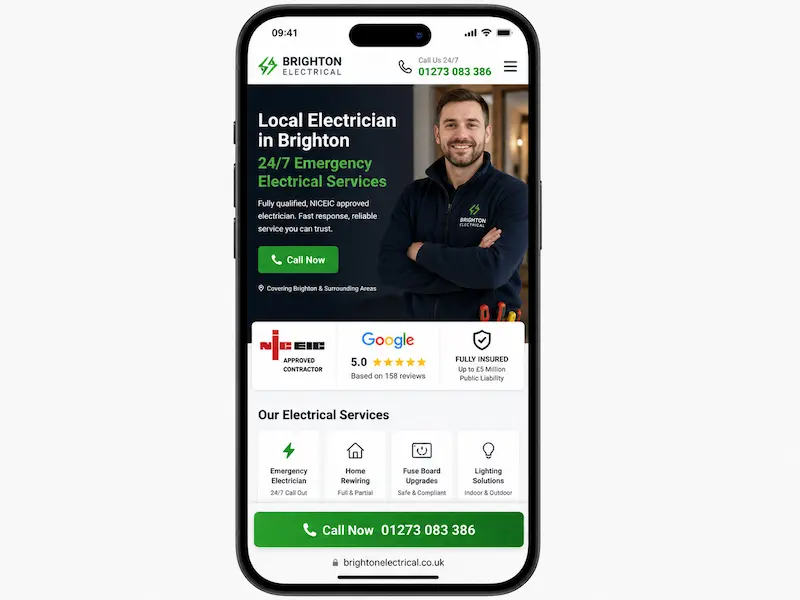
This is the single highest-ROI feature for any trade website. A bright button that follows the user as they scroll, always within thumb's reach, with one job: tap to call.
Compare two experiences. On site A, the visitor has to scroll to the bottom, find the phone number in small text, long-press to copy it, paste it into the phone app, and dial. On site B, their thumb is already on a green "Call Now" button. Which one rings your phone?
Clear Service Areas and Postcodes
Show the towns and postcodes you cover near the top of the page, not hidden three clicks deep. "Covering BS, BA and TA postcodes" reassures the customer instantly that yes, you'll come out to them.
It also helps your local SEO. Google reads those postcodes and matches your site to nearby searches. Two birds, one stone.
Short Enquiry Forms (3 Fields Max)
Long forms on a mobile screen are conversion killers. Name, phone number, brief description of the job. That's it. Everything else can be asked when you call them back.
Every extra field drops your conversion rate. 8-field forms with postcode validation, dropdown menus, and "how did you hear about us" questions belong on enterprise software, not your electrician website.
Trust Signals Visible Without Scrolling
The customer's silent question is always the same: "Are these people legit?"
Answer it before they scroll. Show your NICEIC, NAPIT, or Part P logos. Display your Google star rating. Mention years in business. Add a photo of you and your team standing in front of a branded van. A real face and a real van beat any stock photo of a generic electrician with a clipboard.
This is the kind of detail we focus on at Nestweb when we build websites for electricians and small trade businesses across the UK, because the design needs to do more than look nice. It needs to convince a stranger to dial your number in under 10 seconds.
What Makes an Electrician's Website Feel Trustworthy on a Phone
Even a fast site can feel dodgy if it looks generic. Trust is built in small details:
-
Real photos of real jobs: a tidy consumer unit you installed last week, an EV charger on a customer's driveway, before-and-afters of a kitchen rewire
-
Honest reviews with first names and locations: "Sarah, Clifton: turned up when he said he would and didn't leave a mess"
-
Clear pricing guidance: "EICRs from £150" beats silence. Customers fear hidden costs more than high ones.
-
A face: a photo of you, the owner, with a one-line story. "Hi, I'm Dave. NICEIC-registered, covering BS postcodes since 2011."
"But I'm not a marketer or a photographer." You don't need to be. A phone camera and 10 minutes of honesty beats glossy stock imagery every time. Customers can spot stock photos from a mile away, and it makes them suspicious, not impressed.
Picture two sites side by side. Site A: a stock photo of a smiling man holding a screwdriver, generic copy about "quality service and customer satisfaction". Site B: a photo of Dave next to his actual van, the words "NICEIC-registered, 14 years covering Bristol, no call-out fee on weekdays". Which one gets the call?
Common Mistakes That Kill Mobile Performance
Run through this checklist. Any of these on your site? Each one is a leak in the bucket:
-
Uploading huge unedited camera photos (5MB images on a homepage is common and disastrous)
-
Free WordPress themes loaded with features you never use
-
Pop-ups that cover the whole screen on mobile, with a tiny close button you can't tap
-
Auto-playing videos with sound (instant back-button)
-
Tiny text and buttons crammed together
-
No HTTPS (Google now marks these sites as "Not Secure")
-
Outdated, cheap hosting that crawls under any traffic
The "Built by My Cousin in 2017" Problem
This is the most common scenario we see. A site that worked perfectly fine 5 years ago is now actively hurting business. Why? Because everything has moved on.
Phones got bigger and screens got sharper. Google rewrote its algorithm. Customer expectations changed completely. A site designed when people were still using iPhone 7s on iOS 10 simply doesn't speak the same language as a customer on an iPhone 15.
If your site hasn't been touched in 3+ years, it's not "fine because it still works". It's quietly losing you jobs.
How to Fix It: Realistic Paths Forward
You've got three realistic options, depending on your budget and how hands-on you want to be.
The Quick Wins (Free, This Week)
You can do all of this yourself in an afternoon:
-
Compress your images using free tools like TinyPNG or Squoosh. Bring 5MB photos down to 200KB without losing visible quality.
-
Remove unnecessary plugins. Every plugin you don't use is dead weight slowing your site.
-
Add a click-to-call button. Most website builders have a plugin for this, or your web person can add one in an hour.
-
Fill out your Google Business Profile completely. Photos, services, opening hours, the lot. This alone often beats expensive SEO.
The Mid-Ground (Hire a Freelancer, £500 to £1,500)
If your existing site needs more than a tidy-up, a good freelancer can rebuild it. Ask for:
-
Mobile-first design (specifically those words)
-
Core Web Vitals score above 80 on mobile
-
Integrated call and WhatsApp buttons
-
A simple admin area so you can update services and photos yourself
Red flag to watch out for: anyone promising "#1 on Google guaranteed". Nobody can guarantee Google rankings. Walk away.
For a deeper look at what's realistic at different budgets, this guide on how much a small business website really costs in the UK is worth a read.
The Long-Term Investment (Professional Trade-Specific Build)
For established electricians who get serious leads from their site, a purpose-built website pays for itself fast. Expect £1,500 to £3,500 for something built specifically for trade businesses, with all the conversion features baked in.
This is the route most of our clients take. At Nestweb, we build professional, SEO-optimised websites for UK small businesses starting from £700, designed specifically for mobile and built to turn visitors into phone calls. Worth checking out our breakdown of what every electrician website needs to actually win jobs if you want to see what a properly built trade site includes.
The question isn't "is this expensive?" It's "what's my cost per lead?" If a £2,000 website brings in 4 extra jobs in its first year, it's already paid for itself.
Measuring Whether It's Actually Working
Don't spend money on improvements without tracking results. Otherwise you're flying blind.
Here's a simple setup:
-
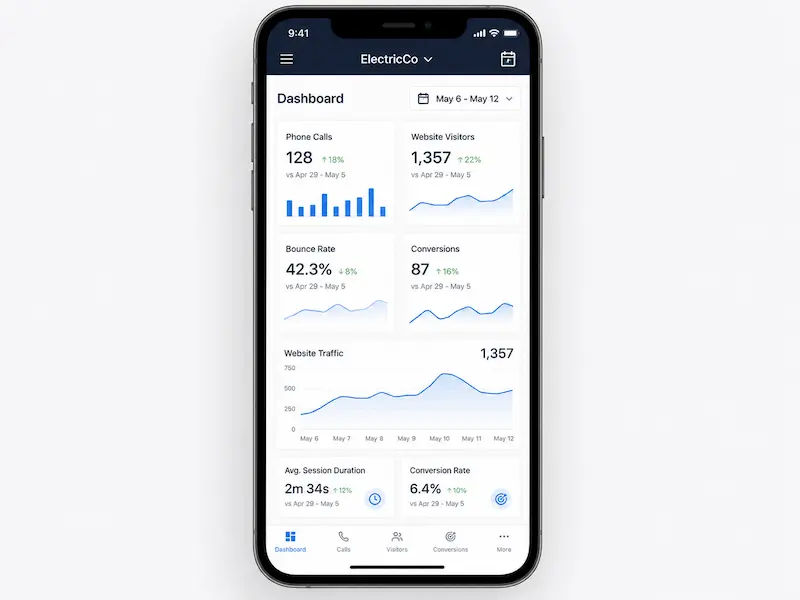
Track phone calls from the site. The simplest version: when someone calls, just ask "how did you find us?" Write it down. Over a month, you'll see patterns.
-
Use Google Business Profile insights. It tells you exactly how many people called you or asked for directions after finding your listing.
-
Check your PageSpeed score before and after any changes. Improvement should be visible in numbers.
-
Watch your bounce rate in Google Analytics. A drop in bounce rate after speed improvements means people are sticking around.
Note your numbers today. Check again in 60 days. If they're moving in the right direction, you've made a good investment. If not, you'll know exactly where to focus next.
The Bottom Line
A mobile-friendly website for electricians isn't a vanity project. It's the difference between being the sparky who gets called and the one who quietly loses jobs to faster competitors.
The customer journey now starts on a phone, often in a panic, and the first site that loads fast, looks trustworthy, and has a tappable call button wins. Speed, clarity, real photos, a sticky call button, and short forms are the basics. None of this is rocket science, but most electrician websites still get it wrong, which means there's a real opportunity for the ones that get it right.
Start with the 5-second test on your phone right now. Run PageSpeed Insights on your homepage. If your score is below 50, you have a problem worth fixing this month, not next year.
If you'd rather skip the DIY route and have it done properly, have a look at the kind of websites we build for trade businesses. At Nestweb, we specialise in fast, mobile-first websites for UK small businesses from £700, built specifically to win local enquiries, not just look pretty.
Your next customer is searching right now. Make sure your site is ready when they tap.
Frequently Ask Questions
How fast should my electrician website load on mobile? Aim for under 3 seconds. Anything slower and you're losing more than half of your potential customers before they even see your services. Test your site with Google PageSpeed Insights, paste your URL, and focus on the mobile score and the LCP (Largest Contentful Paint) metric. A score above 80 is a healthy target.
Do I really need a website if I get all my work from Checkatrade and word of mouth? Yes, and here's why: people Google you before they call, even after a referral. A neighbour might recommend you, but the customer will still search your name to check you're real and read your reviews. Without a proper website, even your strongest referrals start to feel risky. Your website backs up every other channel you have.
What's the difference between a responsive website and a mobile-friendly website?
A responsive website is the technical foundation. It means your site adapts to fit any screen size automatically. Mobile-friendly is the full experience, including fast loading, tappable buttons, readable text, short forms, and a tap-to-call button always visible. You can be responsive without being properly mobile-friendly.
How much should I expect to pay for a good mobile-friendly electrician website in the UK? Honest ranges: doing it yourself with a builder like Wix or Squarespace costs £0 to £100 plus your time. A freelancer can build a decent site for £500 to £1,500. A specialist agency that knows trade businesses charges £2,000 to £5,000+, but the build is purpose-made for converting local enquiries.
Will a faster website actually help me rank higher on Google? Yes. Google uses Core Web Vitals as a ranking factor, especially for mobile searches. A faster site ranks better, all else being equal. But speed alone isn't magic. Combine it with local SEO basics like a complete Google Business Profile, real reviews, and clear service area pages.
Can I make my existing WordPress site mobile-friendly without rebuilding it? Often yes. Start with three things: compress all your images (TinyPNG is free and works brilliantly), switch to a lightweight modern theme like Astra or GeneratePress, and install a caching plugin like WP Rocket. These three changes alone can transform a slow site into a fast one without rebuilding from scratch.