If you've just launched a website for your small business and you can't find it on Google, you're not alone. This is one of the most common (and frustrating) experiences for UK business owners stepping into the online world for the first time.
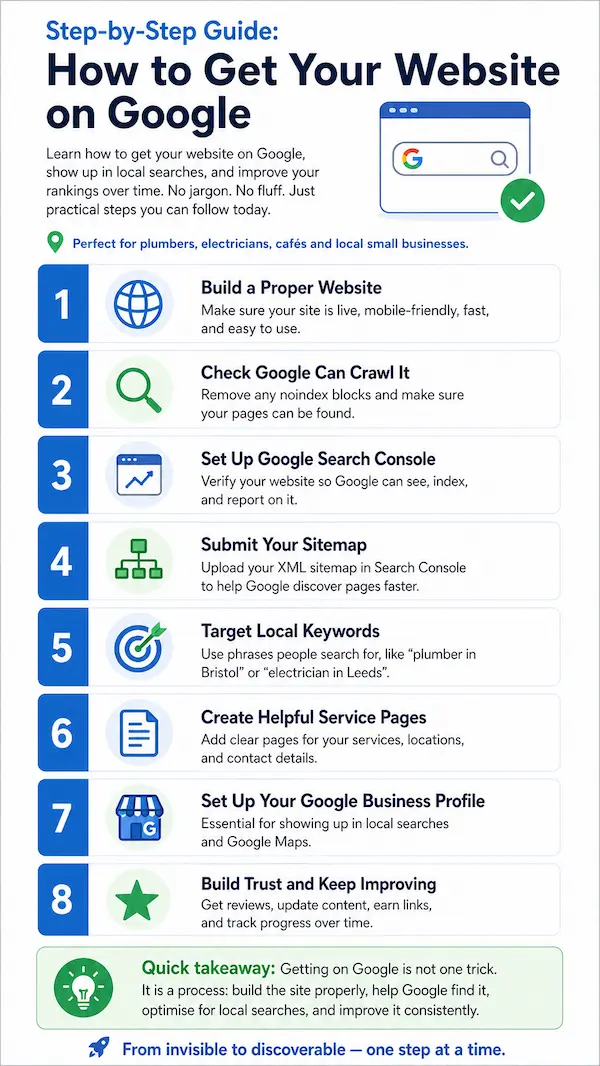
In this guide, you'll learn exactly how to get your website on Google, how to make it show up for local searches in your town, and what it really takes to climb the rankings over time. No jargon, no fluff — just practical steps you can follow today.
Whether you're a plumber in Bristol, a hairdresser in Leeds or a café owner in the Cotswolds, the steps below will help you go from invisible to discoverable, even if you've never touched SEO before.
Why Your Website Isn't Showing Up on Google (And What That Actually Means)
Here's a common misunderstanding: having a website doesn't mean you're automatically on Google. They're two different things.
Think of Google as a giant library. Before your "book" (your website) can be recommended to readers, the library needs to know it exists, send a librarian to read it, and then file it correctly on the right shelf. That process has three stages:
- Crawling — Google's bots visit your site.
- Indexing — Google stores your pages in its database.
- Ranking — Google decides where to show your pages in search results.
For a brand-new site, this process usually takes anywhere from a few days to four weeks. So if you launched yesterday and you're not appearing yet, that's perfectly normal.
Quick check: Type site:yourwebsite.co.uk into Google. If pages show up, you're indexed. If nothing appears, Google hasn't found you yet — and that's exactly what we'll fix next.
A real example: a builder in Nottingham launched his site, did nothing special, and saw it appear in Google after about 10 days. With the steps below, you can speed that up significantly. And no, you don't need to pay Google to be listed — basic indexing is completely free.
The Quickest Way to Get Your Website on Google
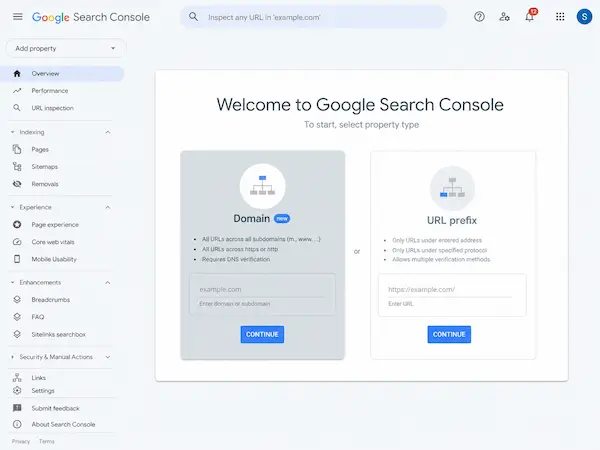
The fastest way to tell Google your site exists is through Google Search Console — a free, official tool from Google. It's the equivalent of walking into the library and saying, "Hi, here's my book, please add it to the catalogue."
Set Up Google Search Console (Step by Step)
Head to search.google.com/search-console and sign in with a Google account.
You'll be asked to choose between two property types:
- Domain — covers your whole website (recommended if you're unsure).
- URL prefix — covers a specific version of your site.
Pick Domain, then verify ownership. The easiest methods are:
- DNS record (paste a small text record where you bought your domain).
- HTML file upload.
- Google Analytics, if you already use it.
If you use WordPress, plugins like Yoast or Rank Math can verify you in seconds. Wix, Squarespace and Shopify all have built-in Search Console integrations under their SEO settings.
Submit Your Sitemap to Google
A sitemap is essentially a list of all your pages — Google's shortcut to understanding your site.
The good news: most modern websites generate one automatically. Try visiting yourwebsite.co.uk/sitemap.xml. If a page of links appears, you've got one.
To submit it:
- Open Search Console.
- Click Sitemaps in the left menu.
- Paste sitemap.xml and hit Submit.
WordPress users with Yoast or Rank Math, Wix, Shopify and Squarespace users all have automatic sitemaps — no coding required.
Request Indexing for Important Pages
Want your homepage or your "Contact" page indexed faster? Use the URL Inspection tool at the top of Search Console. Paste the URL, and click Request Indexing.
It's especially useful right after launch or when you publish a new service page. A plumber in Bristol used this trick and got his "Emergency Plumber Bristol" page indexed the very same day.
How to Make Your Website Show Up on Google for Local Searches
Getting indexed is step one. But if you're a local business, what you really want is to appear when someone types "electrician near me" or "plumber in Leeds".
Local search works differently. Google looks at your location, your Google Business Profile, your reviews, and how relevant your site is to that specific area. So if your competitors are showing up and you're not, this section is for you.
Claim and Optimise Your Google Business Profile
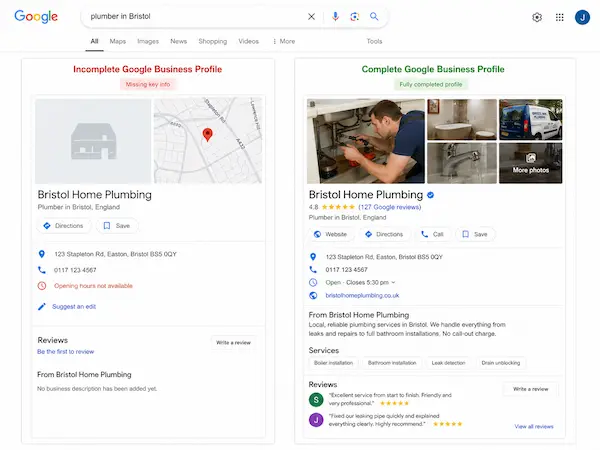
For most UK small businesses, your Google Business Profile brings in more leads than the website itself. It's the box that appears on the right when someone searches your business name, plus the map listings (the famous "Map Pack").
Setting it up is free at google.com/business:
- Choose the right primary category (e.g. "Electrician", not just "Contractor").
- Add accurate opening hours, photos, and services.
- If you don't have a shop front (think dog walkers, mobile mechanics, mobile hairdressers), set a service area with the towns you cover.
- Make sure your NAP — Name, Address, Phone — matches exactly what's on your website.
A complete profile with photos, services and regular updates can get up to 5x more views than an empty one. It's free and takes about 30 minutes.
Get Reviews That Actually Help You Rank
Reviews are one of the strongest local ranking signals. According to BrightLocal's UK Consumer Review Survey, the vast majority of UK consumers read reviews before choosing a local business.
A few tips:
- Ask in person or by message after a job is finished, when satisfaction is highest.
- Don't offer discounts or freebies in exchange — that breaks Google's guidelines.
- Reply to every review, especially negative ones. A calm, professional reply often impresses future customers more than the original complaint.
A simple WhatsApp message that works: "Hi Sarah, really glad you were happy with the work today. If you have a spare minute, a quick Google review would mean a lot — here's the link."
Use UK-Specific Local Signals on Your Site
Most online SEO advice is American. Here's what actually matters in the UK:
- Show your full UK address with postcode in the footer.
- Use UK phone format (e.g. 0161 xxx xxxx).
- Mention the cities and neighbourhoods you serve naturally in your content.
- A .co.uk domain helps signal local relevance, but .com works fine too — don't change domains just for this.
- List your business in trusted UK directories like Yell, FreeIndex, Thomson Local and Trustpilot. Free listings are usually enough — paid ones rarely justify the cost for very small businesses.
This is one of the things we focus on at Nestweb when building websites for UK small businesses: every site we build (from £700) is set up with these local signals in place from day one, so you don't have to think about them.
How to Get Your Website on Google's First Page (Realistically)
Let's be honest: ranking on Google's first page in a week is unrealistic. Showing up on Google? Easy. Reaching the first page for competitive terms? That takes time, especially if you're competing with established businesses.
The trick is choosing realistic keywords. Trying to rank for "plumber" is a war you won't win quickly. But "emergency plumber in Brighton on a Sunday"? Much easier — and the people searching that are ready to call you.
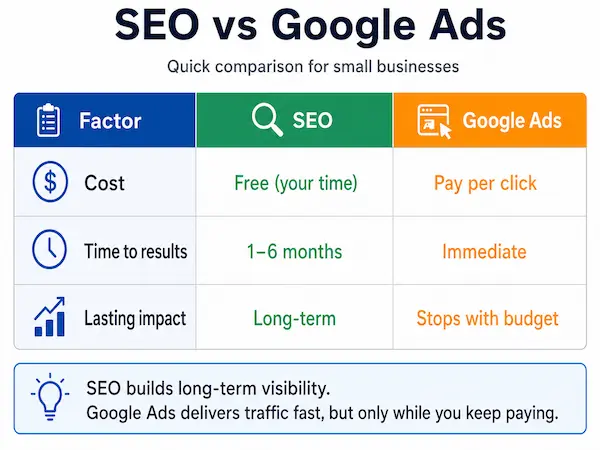
You also can't pay Google to rank organically. Google Ads is a separate (paid) system that gets you to the top of results immediately, but stops the moment you stop paying. Organic SEO is slower but compounds over time.
Choose Keywords Real Customers Actually Search
Forget how you describe your business. Think how a customer would describe their problem.
Instead of "plumbing services Brighton", try:
- "boiler repair Brighton"
- "blocked drain Hove"
- "emergency plumber near me Brighton"
- "leaking tap fix BN1"
- "gas safe engineer Brighton"
Use Google's autocomplete, the "People also ask" box, and the free Keyword Planner inside Google Ads to find more ideas.
Write Pages That Answer One Clear Question
One page, one topic. That's the rule.
A homepage that just says "Plumber" will struggle. A page titled "Emergency Plumber in Edinburgh — 24/7 Call-Outs" tells Google (and customers) exactly what you offer.
Each page needs:
- A clear title tag (the blue link in search results).
- An H1 that matches the customer's question.
- A meta description written to be clicked, not stuffed with keywords.
- Plain language. Write the way your customers speak.
Make Sure Your Site Works on Mobile and Loads Fast
More than 60% of UK local searches happen on mobile. If your site is slow or hard to use on a phone, you'll lose both customers and rankings.
Test your site at pagespeed.web.dev. Common easy fixes:
- Compress large images (most are way bigger than they need to be).
- Remove unused plugins.
- Choose decent hosting — cheap hosting often means slow sites.
You don't need to rebuild your site to fix this. Often a couple of tweaks make a real difference.
How to Stay on Google (and Keep Climbing) Over Time
SEO isn't a one-and-done task. It's more like going to the gym — small, consistent efforts build over months.
A simple 30-minute monthly routine that works:
- Check Search Console for errors or new keywords you're appearing for.
- Add one new Google Business Profile post or photo.
- Reply to recent reviews.
- Update one page (new info, new photo, fresh detail).
- Add a short blog post answering a question customers actually ask you.
Building local authority also helps: get listed in your local Chamber of Commerce, sponsor a small community event, or partner with another non-competing local business — those mentions and links carry weight.
Don't have time for any of this? That's part of what we do at Nestweb — we build SEO-ready sites for UK small businesses and can handle the ongoing optimisation so you can focus on running your business.
Common Mistakes That Keep Small Business Sites Off Google
Even great-looking sites can be invisible due to small mistakes. Watch out for:
- "Discourage search engines" left ticked in WordPress. A single forgotten checkbox can hide your entire site for months.
- Duplicate content copied from competitor sites. Google ignores it.
- Missing or duplicate page titles. Every page needs a unique one.
- Abandoned Google Business Profiles. Empty profiles drop in rankings.
- Changing domain without 301 redirects. You lose all your existing rankings overnight.
Real example: a small Cotswolds shop was invisible on Google for four months. The cause? One ticked box in WordPress settings. Fixing it took 30 seconds.
Conclusion: Your Next Steps
Getting your website on Google isn't about magic or hidden tricks. It comes down to a clear sequence:
- Set up Google Search Console and submit your sitemap.
- Claim and optimise your Google Business Profile.
- Add UK-specific local signals to your site.
- Choose realistic, customer-focused keywords.
- Keep your site fast, mobile-friendly and updated regularly.
Do these consistently and you'll start showing up — first for your business name, then for local searches, and over time for the keywords that actually bring customers.
If you'd rather not do it alone, at Nestweb we build professional, SEO-optimised websites for UK small businesses starting from £700 — local signals, Search Console, sitemap and Business Profile setup all included. Book a free 15-minute SEO health check and we'll tell you exactly what's holding your site back.

Frequently Asked Questions
How long does it take for a new website to appear on Google? Usually between a few days and four weeks. Submitting your sitemap through Search Console and requesting indexing can speed this up significantly.
Is it free to get my website on Google? Yes. Indexing through Search Console and creating a Google Business Profile are completely free. Only Google Ads costs money — that's a separate, paid service.
Why does my competitor's website appear on Google but not mine? Common reasons: they've been indexed and you haven't, they have a complete Google Business Profile, their site has more relevant content, or they have stronger local links and reviews.
Do I need a .co.uk domain to rank in the UK? No. A .com works fine. A .co.uk slightly helps with local relevance, but a complete Business Profile, UK address and customer reviews matter much more.
How do I make my website appear on Google Maps? Through a verified Google Business Profile with consistent NAP details (Name, Address, Phone) matching your website.
Can I get my website on Google's first page without paying? Yes — especially for local, specific searches. Targeting low-competition local keywords with a well-optimised site and Business Profile makes first-page rankings achievable for most small UK businesses.